
CleanBooks Bookkeeping
A next-generation bookkeeping platform designed specifically for the UK market, combining intelligent automation with conversational AI to make financial management accessible to SMEs, freelancers, and sole traders.
MY ROLE
Product Designer & AI Design Director
TOOLS
Figma AI
Claude AI
Chat GPT
PRODUCT TYPE
SaaS Product(AI Native)
WHAT IS CLEANBOOKS
CleanBooks is a conversational bookkeeping platform designed specifically for the UK market. It replaces complex accounting software with an AI assistant named Keeva who speaks plain English, automates tedious tasks, and keeps businesses compliant with HMRC regulations.
Instead of navigating spreadsheets and accounting jargon, users simply ask: "When is my VAT due?" or "Can I afford to hire someone?" Keeva answers instantly with context-aware insights drawn from their real financial data.
The Vision: Make bookkeeping accessible to non-accountants while maintaining the rigor required for tax compliance and financial planning.
THE PROBLEM
Complexity Overload- Existing platforms (QuickBooks, Xero, Sage) are built for accountants, not business owners. Understanding charts of accounts, double-entry bookkeeping, and VAT schemes requires specialized knowledge most entrepreneurs don't have.
Time Drain- Manual data entry, receipt chasing, and transaction categorization consume 8-12 hours per month; time that could be spent growing the business instead of maintaining records.
Compliance Anxiety- UK tax regulations are intricate:
VAT returns due quarterly with specific box calculations
Making Tax Digital (MTD) requires approved software
Corporation Tax, PAYE, Self Assessment deadlines are easy to miss
Penalties for errors or late submissions are steep
DESIGN PROCESS
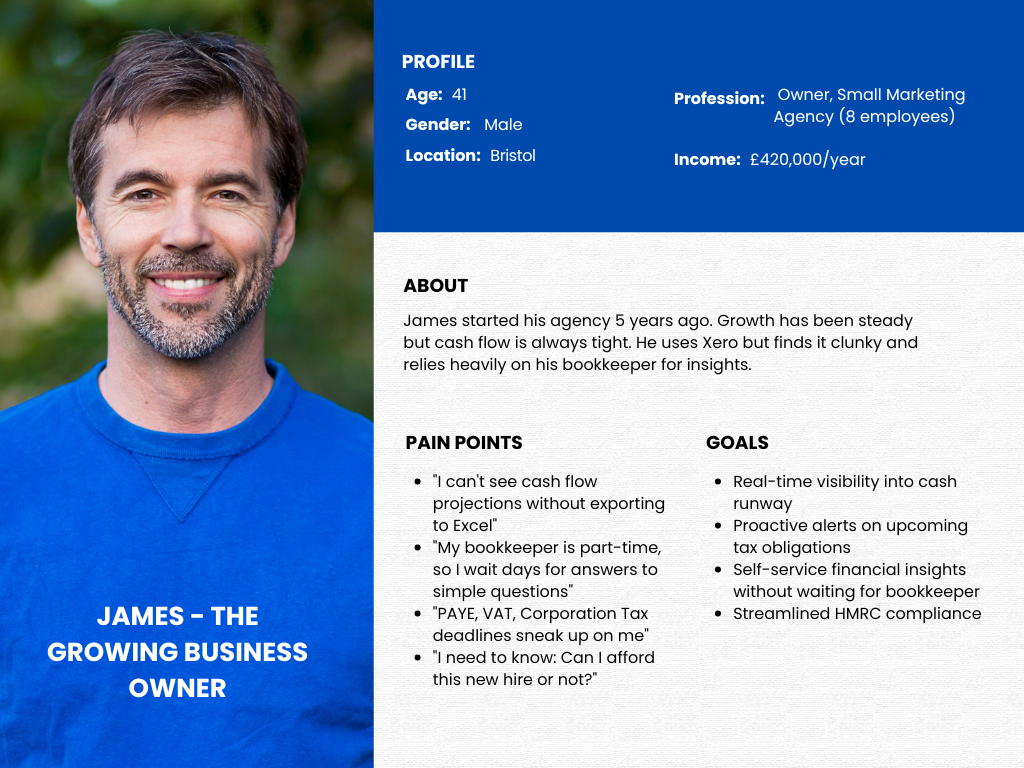
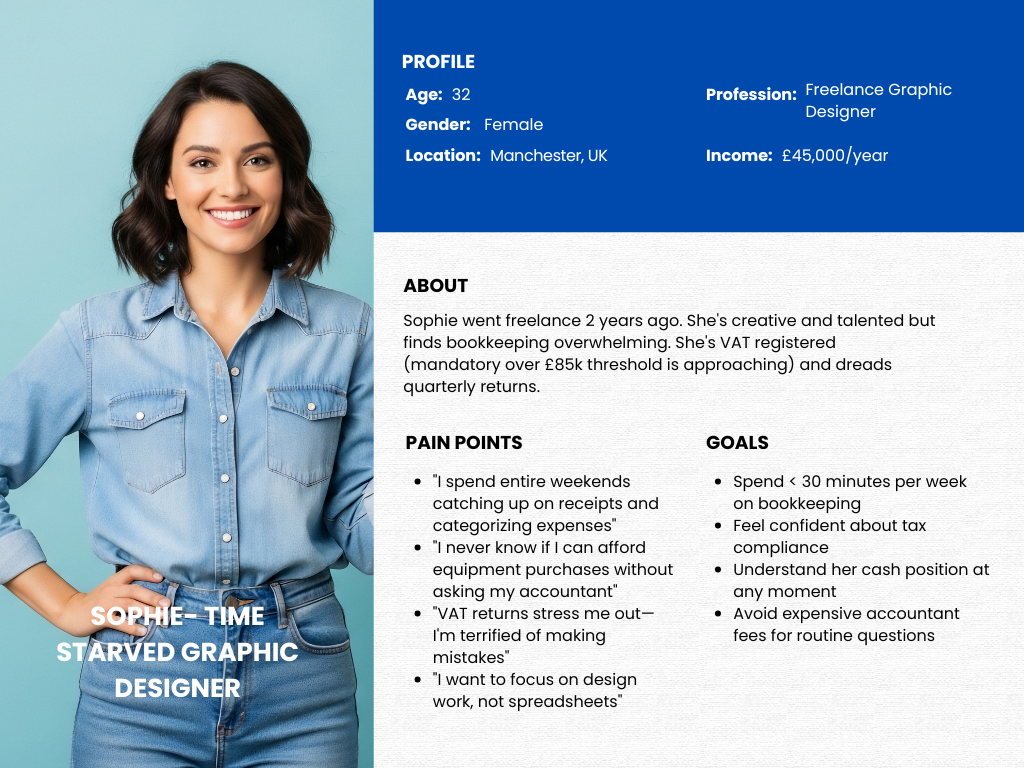
Personas
.png)
THREE CHOICES THAT DEFINED THE PRODUCT.
1. Conversation-First, Not Form-First
The Decision:Make Keeva (the AI assistant) the primary interface, not a help feature buried in a menu. Users should be able to accomplish any task through natural conversation.
Why It Matters:Forms and navigation menus assume users know accounting terminology and where to find features. Conversation removes that barrier:
Traditional Approach:
Navigate to Invoices > Create New Invoice
Fill in form fields: Client, Amount, Line Items, VAT Rate, Due Date
Preview, Save, Send
Navigate to Reports > Aged Receivables to track payment
CleanBooks Approach:User: "Create an invoice for £500 to Acme Ltd for web design, due in 30 days"
Keeva: "Invoice created! £500 + £100 VAT = £600 total, due March 7th. Shall I send it now?"
User: "Yes"
Keeva: "Sent! I'll remind you if it's not paid by March 10th."
Impact:
Faster task completion (30 seconds vs 3 minutes)
No learning curve for new features
Accessible to non-accountants
Feels like having a helpful colleague, not fighting software
Trade-Off:Traditional power users may initially prefer forms. Solution: Provide both—Keeva for speed, forms for detailed control.
2. UK-Native, Not Adapted
The Decision:Build exclusively for UK tax regulations from day one, rather than adapting a US platform with UK "support."
Why It Matters:Competitors like QuickBooks and FreshBooks are US-built with UK features bolted on. This creates friction:
Problems with Adapted Software:
American terminology ("sales tax" vs "VAT")
Date formats (MM/DD/YYYY vs DD/MM/YYYY)
Tax year confusion (January vs April)
Missing UK-specific features (CIS, Flat Rate VAT)
Poor HMRC integration (third-party plugins)
CleanBooks UK-Native Features:
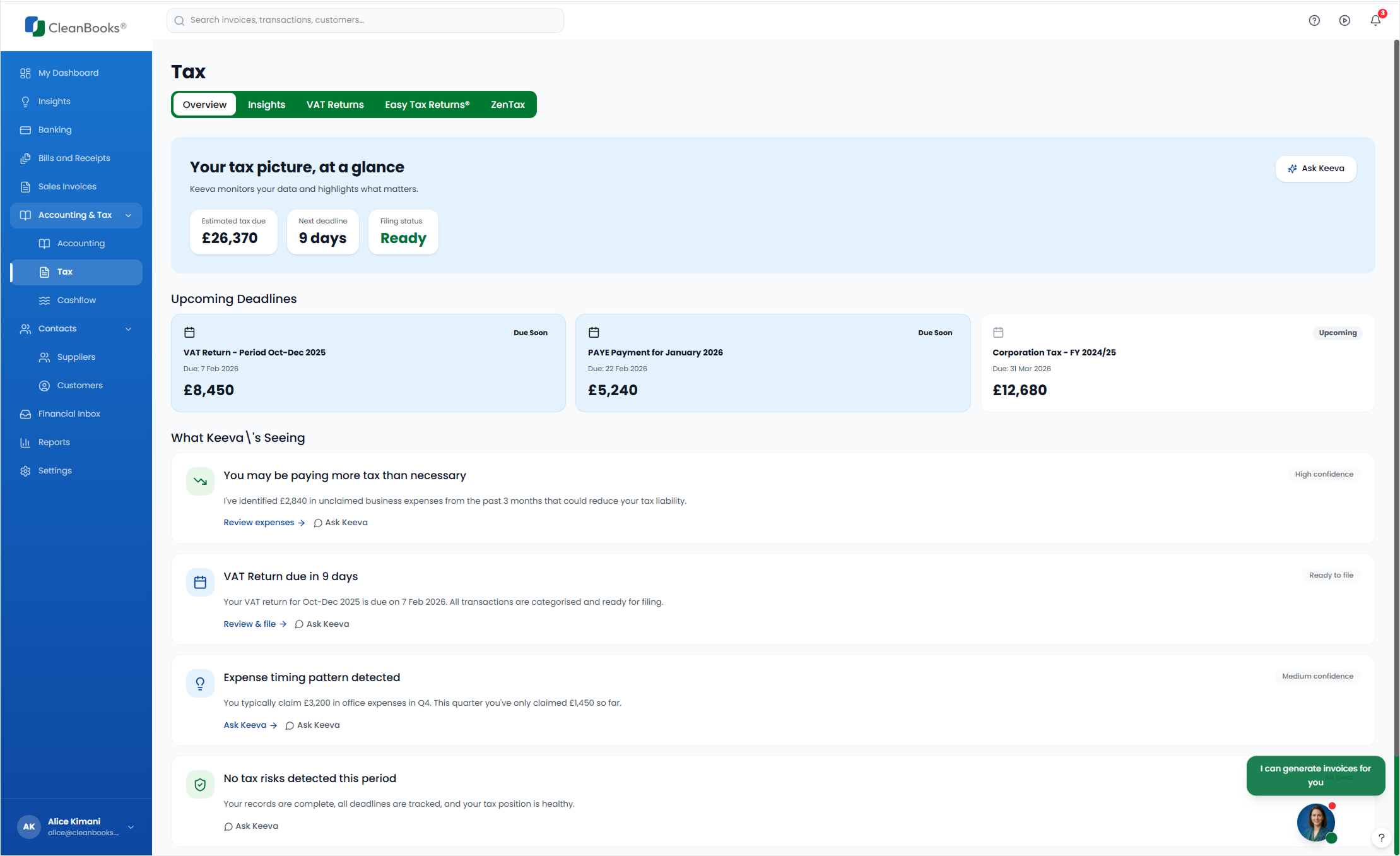
Making Tax Digital certified - Direct HMRC integration for VAT returns
British English - "Turnover" not "revenue," "whilst" not "while"
UK tax year - April to April, not calendar year
VAT schemes - Standard, Flat Rate, Cash Accounting built-in
UK bank integration - TrueLayer Open Banking, not Plaid
Compliance calendar - Corporation Tax (9 months after year-end), PAYE (19th monthly), VAT (quarterly)
Real-World Example:Sophie's VAT return:
Traditional software: Export transactions, calculate Box 1-9 manually, use HMRC portal separately
CleanBooks: Click "Submit VAT Return" → Pre-filled boxes → Review → Submit directly to HMRC → Done in 2 minutes
Impact:
Compliance becomes simple, not scary
No "translation" from US accounting concepts
HMRC deadlines tracked automatically
One-click tax submissions
3. Proactive Intelligence, Not Reactive Reporting
The Decision:Surface AI-generated insights automatically rather than making users generate reports to discover problems.
Why It Matters:Traditional bookkeeping software is reactive—you have to ask the right questions. Most users don't know what questions to ask until problems emerge.
Traditional Approach:User logs in → Dashboard shows numbers → User thinks "Hmm, that looks okay" → User logs out
Reality: Software expenses increased 40% but user didn't notice until quarter-end tax shock
CleanBooks Approach:User logs in → Dashboard shows: "What We're Seeing"
Keeva's Insights:
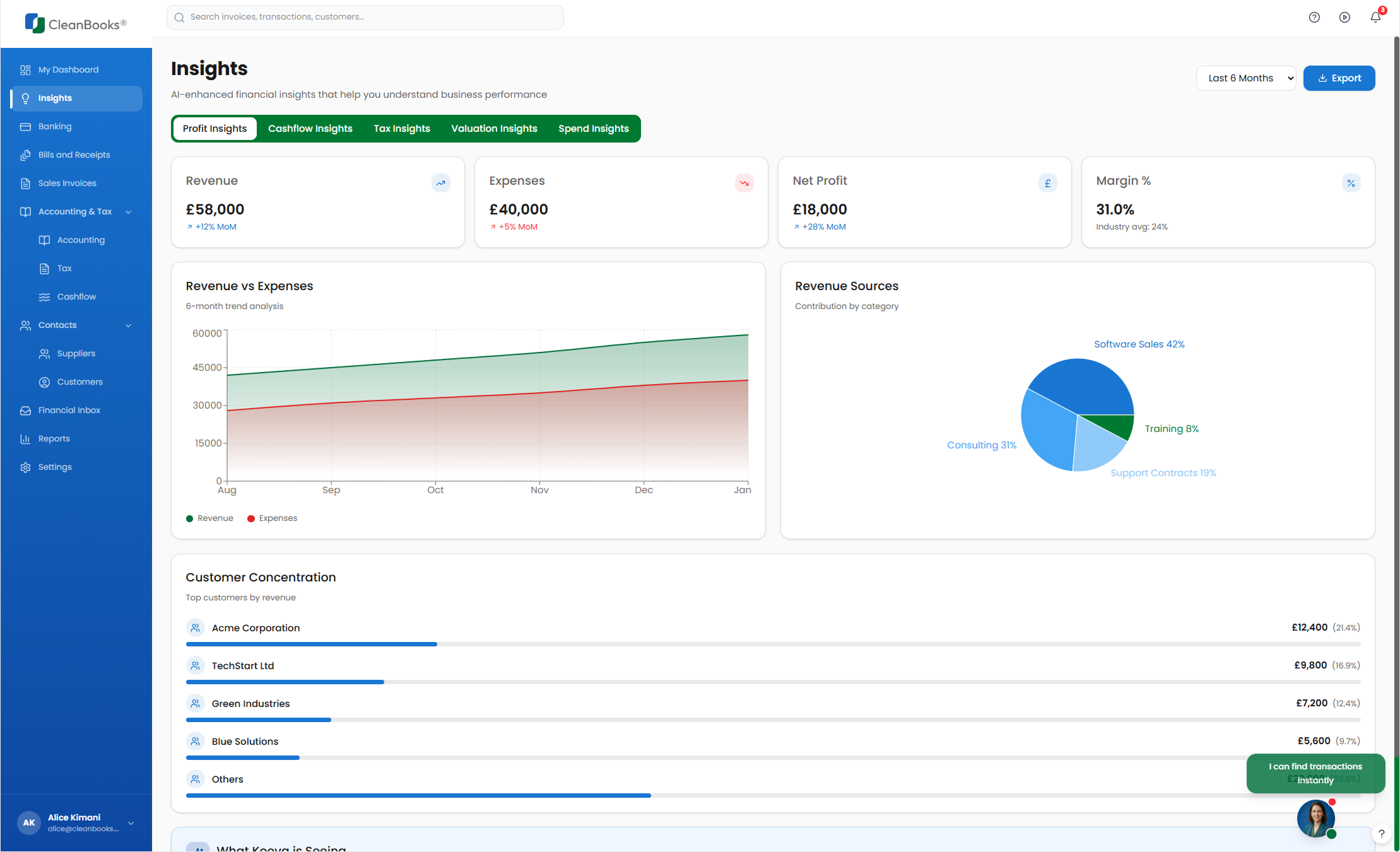
"Expenses increased 12% MoM due to software subscriptions. You're now paying for 7 SaaS tools—consider reviewing unused licenses."
"You have runway for approximately 8 months at current burn rate. This is healthy."
"Revenue trending positively - up 8.2% from last month. New client acquisitions are driving growth."
"Your effective tax rate this quarter will be ~21%. Set aside £4,200 for Corporation Tax by December 31st."
How It Works:
AI analyzes transactions, trends, benchmarks
Detects anomalies (spikes, new recurring charges, payment delays)
Generates plain English explanations with context
Recommends actions (review licenses, set aside tax money, chase invoices)
Updates daily as new transactions sync
Impact:
Problems caught early, not at year-end
Users learn their business patterns
Actionable insights, not just data
Peace of mind (AI is watching for red flags)
Example:James (agency owner) logs in on Monday morning:
Without Proactive Intelligence:Dashboard shows £12,340 cash balance. Looks fine. ✅
With Proactive Intelligence:Dashboard shows £12,340 cash balance + Keeva insight:
"Heads up: You have £8,200 in PAYE and VAT due in 9 days. After paying these, your working capital will be £4,140. Consider delaying the new laptop purchase until next month's client payments arrive."
James adjusts plans, avoids cash crunch. 🎯
HOW I USED AI TO DESIGN AN AI PRODUCT.
This project showcases AI-assisted design - a methodology where artificial intelligence amplifies designer capabilities without replacing human judgment. Here's how I collaborated with AI at each stage:
Research & Analysis (AI as Research Assistant)
What AI Did:
Analyzed Bookeeping.ai and Wyzr.uk (competitors) - extracted UI patterns, features, pricing, user flows
Parsed 50+ page technical requirements document - summarized key points, identified gaps
Generated competitive feature matrices comparing 20+ platforms
Researched UK tax regulations (VAT schemes, MTD requirements, HMRC deadlines)
My Role:
Defined research questions and success criteria
Validated AI findings against UK market realities
Identified opportunity gaps competitors missed
Made strategic decisions about positioning
Time Saved: 3-4 weeks of manual research → 3-4 days with AI assistance
Information Architecture (AI as Strategic Partner)
What AI Did:
Generated 5 navigation structure variations
Mapped user tasks to features (e.g., "check cash position" → Dashboard + Cashflow page)
Identified redundant features from requirements doc
Proposed page-level content hierarchies
My Role:
Selected best navigation structure based on user mental models
Made trade-offs (combined vs separate pages)
Incorporated stakeholder feedback (split Insights & Cashflow)
Ensured UK-specific features were prominent (Taxes & Compliance)
Key Decision (Human-Led):Stakeholders initially wanted "Insights & Cashflow" as one page. I proposed splitting them:
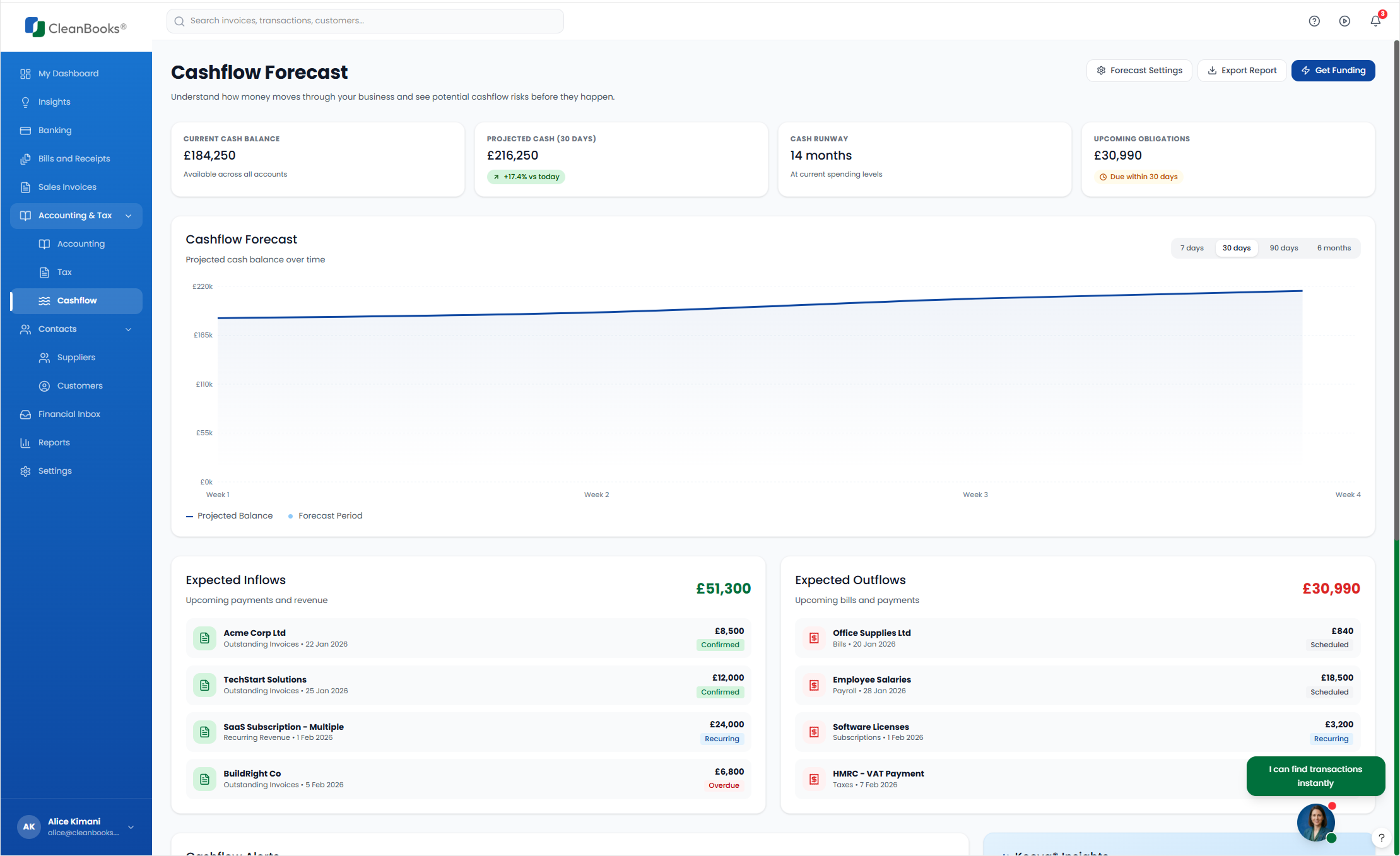
Insights = Retrospective (what happened and why)
Cashflow = Prospective (what's coming next)
Used AI to reorganize content, ensuring no feature loss. Result: Clearer user journeys.
Visual Design (AI as Design Assistant)
What AI Did:
Extracted design patterns from competitor screenshots
Generated color palette suggestions based on "trustworthy UK fintech"
Proposed typography scales and spacing systems
Created component specifications (buttons, badges, cards)
My Role:
Made all aesthetic decisions (colors, fonts, layout)
Designed for emotional impact (calm, confident, approachable)
Ensured British visual language (inspired by Monzo, Starling, Wyzr)
Created design system rules and guidelines
Process (AI-Native Design):
I defined design goals in natural language: "Create a dashboard that feels trustworthy, modern, and calming for UK small business owners managing financial data"
Used Figma Make (AI design assistant) to generate initial layouts and component variations
Iterated through conversation: "Make the metric cards more spacious," "Use a blue that conveys trust"
AI generated the color palette, typography scale, spacing system
I selected the final options from AI-generated variations based on emotional impact and UK market fit
AI produced the complete design system with tokens and specifications
What AI Generated:
Color palette options (I selected Blue #3b82f6 from 5 options for trust + optimism)
Typography pairings (I chose poppins for financial readability from 3 font suggestions)
Layout variations (I selected generous whitespace for cognitive load reduction)
Component styles (I chose 8px rounded corners for approachability)
My Role:
Defined design principles and emotional goals
Made final aesthetic selections from AI-generated options
Ensured designs aligned with UK market expectations
Validated that visual choices supported user tasks (scanning numbers, reading insights, taking action)
Conversation Design (AI as Dialogue Partner)
What AI Did:
Simulated 100+ Keeva conversations with different user intents
Generated sample responses for common queries
Tested UK tax knowledge (VAT, PAYE, Corporation Tax)
Proposed function calling structures (task execution)
My Role:
Defined Keeva's personality (helpful British colleague, not corporate robot)
Set conversation boundaries (what Keeva can/can't do)
Wrote key conversation examples that set the tone
Decided when Keeva should defer to human accountants
Keeva Personality Guide (My Creation):
Tone:
Professional but warm: "Hello! I'm Keeva, your AI financial assistant"
Plain English, no jargon unless explaining it: "Burn rate means how much you spend per month"
British terminology: "VAT return" not "sales tax filing"
Confident but humble: "I think this should be categorized as X, but you know your business best"
Boundaries:
Keeva CAN: Answer tax questions, categorize transactions, create invoices, explain numbers
Keeva CANNOT: Give investment advice, guarantee tax savings, override user decisions
Testing with AI:I role-played as confused users, asking edge cases like:
"Can I claim my dog as a business expense?" (No, unless it's a guard dog for business premises)
"Should I register for VAT?" (Keeva explains thresholds, pros/cons, but doesn't decide)
AI helped ensure Keeva stays helpful without crossing into unqualified advice.
KEY SCREENS
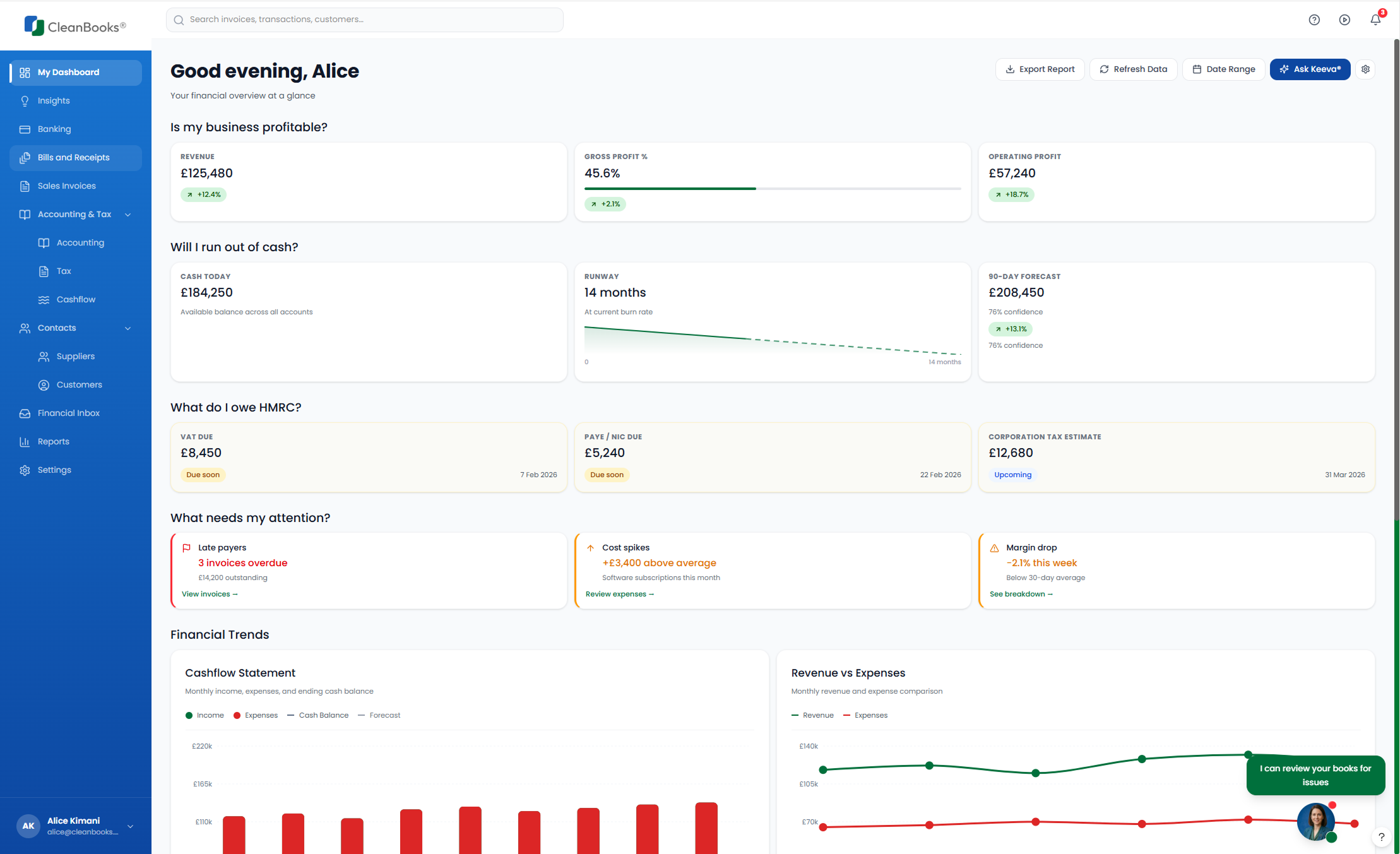
Dashboard - Financial Command Center
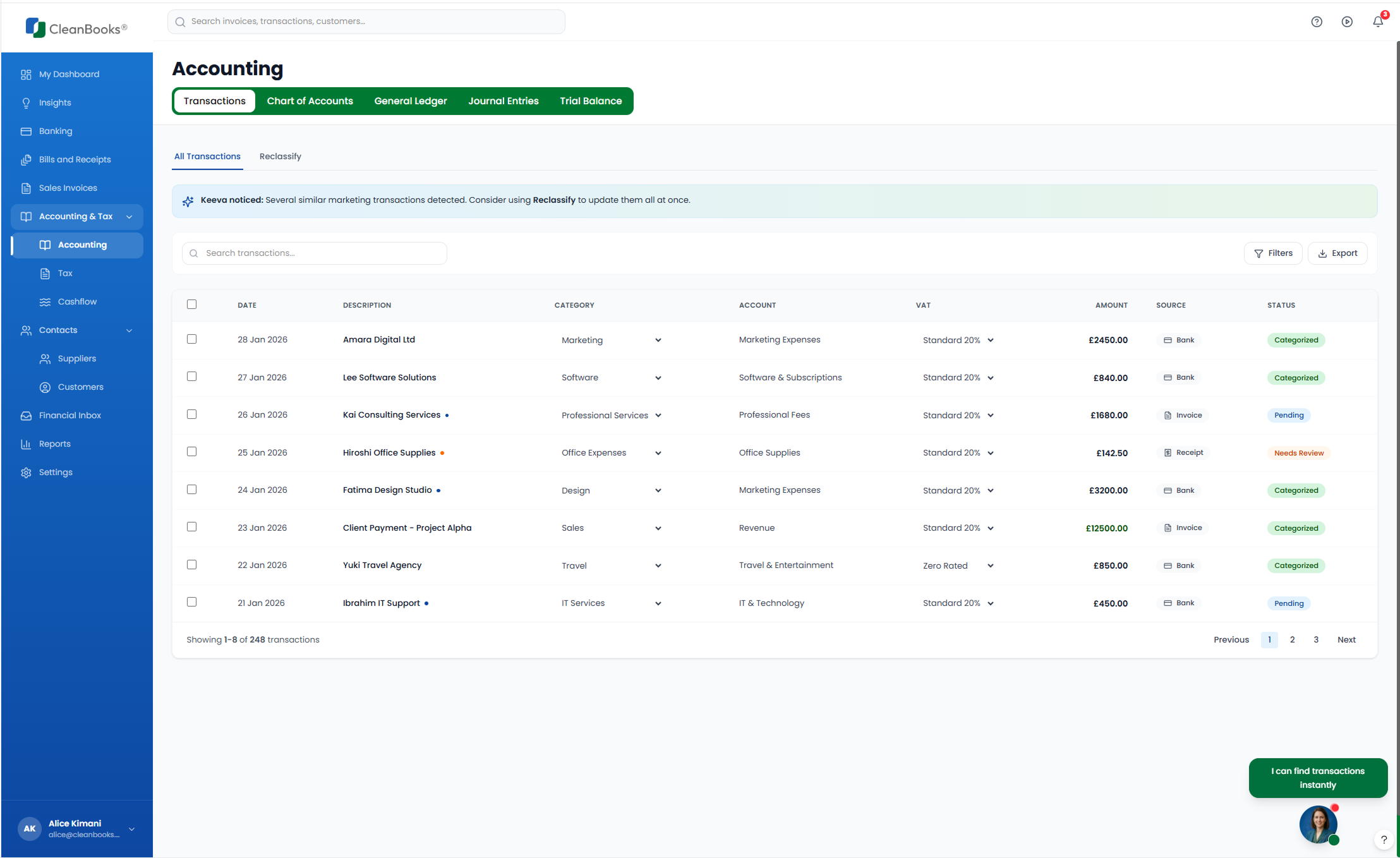
Transactions - Smart Categorization Interface
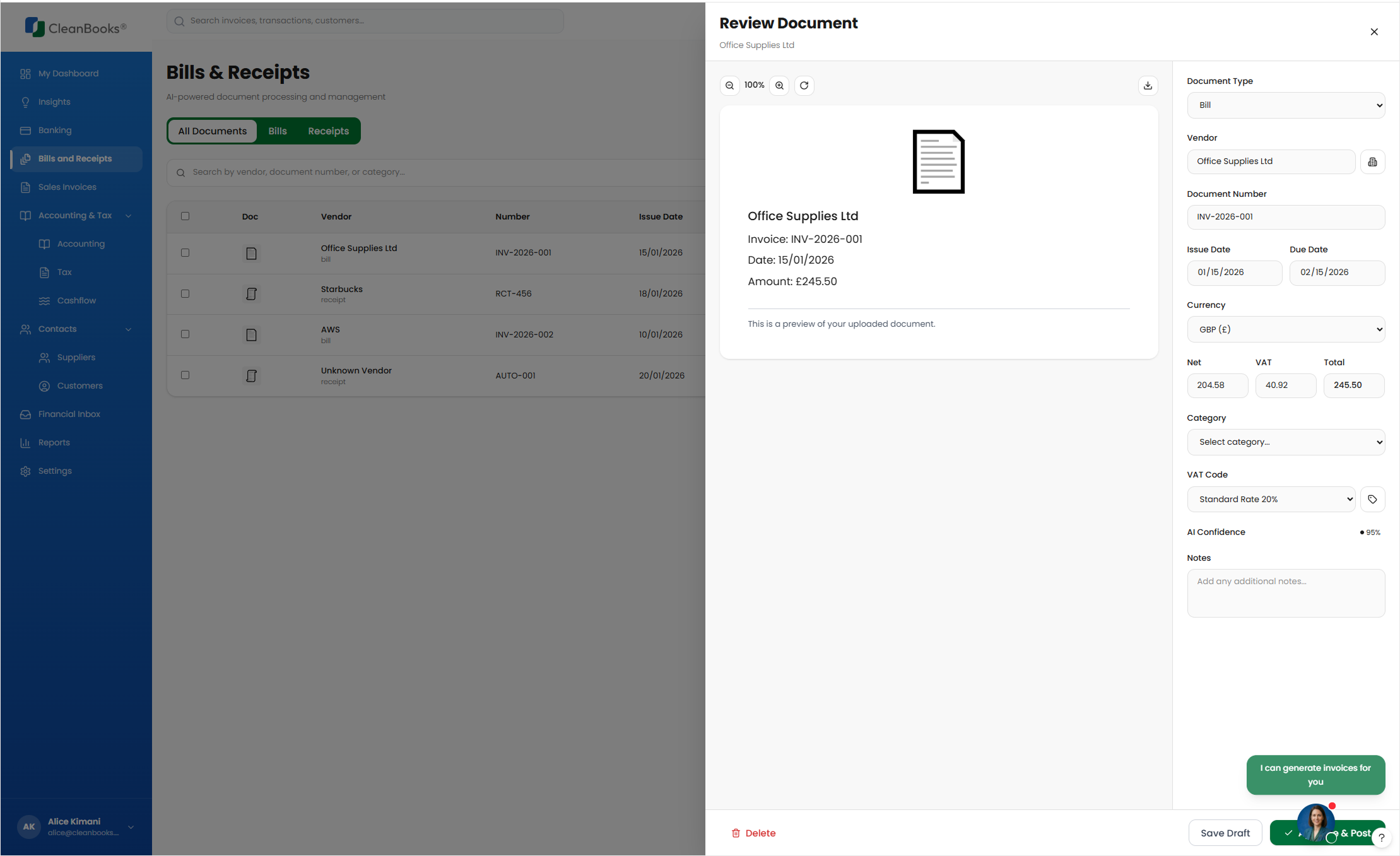
Receipts - Intelligent Document Processing
Insights - AI-Powered Financial Intelligence
Cashflow - Forward-Looking Financial Planning
Taxes & Compliance - HMRC Made Simple
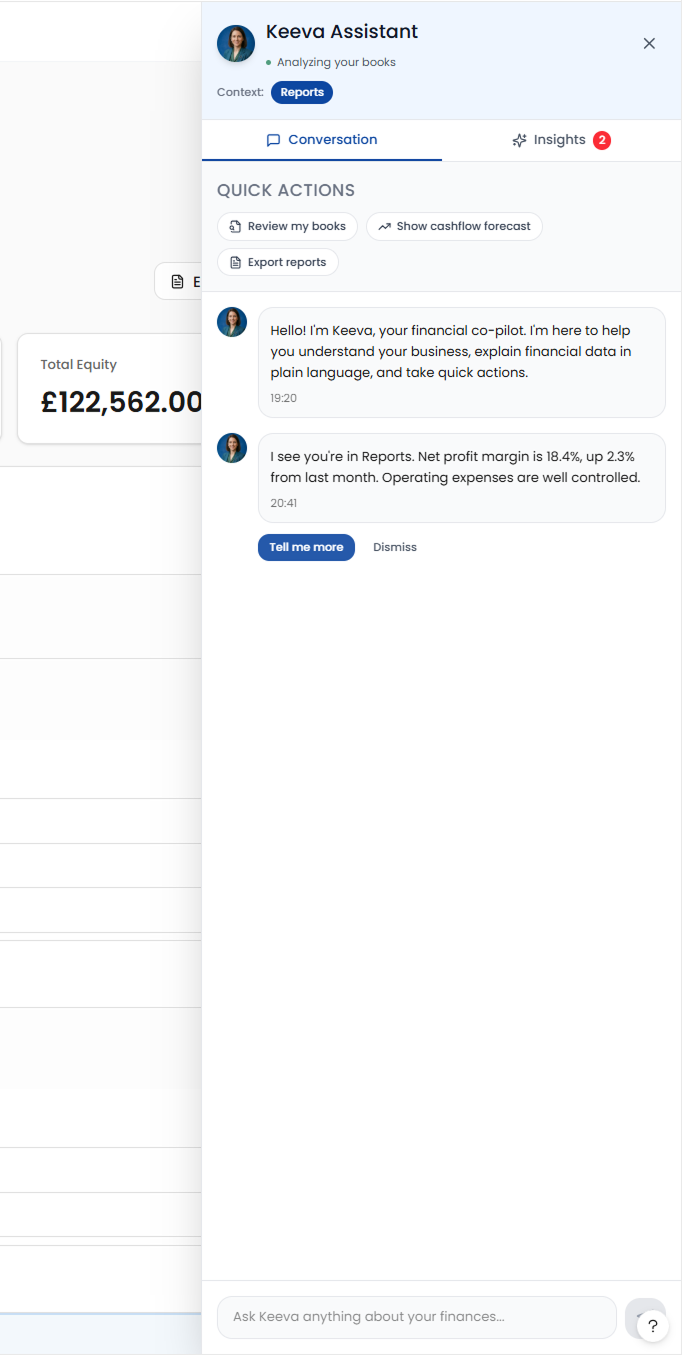
Keeva AI Assistant
WHAT THIS PROJECT DEMONSTRATES
Design Skills:
- End-to-end product design (research → delivery)
- Complex data visualization and financial UX
- Conversational AI interface design
- Design systems and component libraries
- UK compliance and regulatory design
AI-Assisted Workflow:
- Strategic use of AI for research acceleration
- Human-AI collaboration maintaining quality
- Validation frameworks for AI-generated content
- Documentation efficiency without losing rigor
Business Acumen:
- Competitive analysis and market positioning
- Regulatory compliance understanding (HMRC, MTD)
- Feature prioritization based on user value
- Technical feasibility and build/buy decisions